API
Konstruktor
constructor
new Report(
    htmlOrOptions: string | ReportOptions
): Report
Parameter
htmlOrOptions: string | ReportOptions: Der Parameter kann entweder ein Html-String enthalten oder ein Objekt vom Typ ReportOptions
Beispiel
context.enableModules();
const { Report } = require("ou.sp.Report");

context.returnValue = new Report("<h1>Howdy!</h1>");
Erweitertes Beispiel:
context.enableModules();
const { Report } = require("ou.sp.Report");

const options {
    html: "<h1>Howdy!</h1>",
    pdfConverter: new PuppeteerPdfConverter(),
}
context.returnValue = new Report(options);
Statische Funktionen
fromFileCoverTemplate : Report
Erstellt eine neue Report Instanz. Dabei wird das standardisierte FileCover Template geladen und mit dem Daten aus dem DocFile kompiliert.
Bitte folgende Punkte beachten:
- Gadget Felder werden ignoriert.
- Die Reihenfolge der Felder bezieht sich immer aus documents. Die Reihenfolge in der
includedFieldsist irrelevant!
fromFileCoverTemplate(docFile: DocFile, fileCoverOptions: {
    includedFields?: Array<string>;
    excludedFields?: Array<string>;
    multiTableFields?: Array<{
        fieldName: string;
        columns: Array<string>;
    }>;
    asPdf?: boolean = true;
    showPageFooter?: boolean = true;
}): Report
Parameter
docFile: DocFile: Das DocFile welches verwendet werden sollfileCoverOptions.includeFields: (Optional) Array mit Felder, welche im Report sichtbar sein sollen (Achtung: ist ein Feld unsichtbar ist und hier mit angegeben, wird es trotzdem im Report angezeigt).fileCoverOptions.excludedFields: (Optional) Array mit Felder, welche im Report nicht sichtbar sein sollen.fileCoverOptions.multiTableFields: (Optional) Array mit Informationen über zu einem MultiTable.fileCoverOptions.asPdf: (Optional) Template wird für eine PDF-Datei optimiert (Ausgabe eines gültigen HTMLs mit Body usw.).fileCoverOptions.showPageFooter: (Optional) Nur in Verbindung mitasPdf, Zeit unten in der Fusszeile Informationen zur Mappe an (Ersteller und letzter Bearbeiter)
Beispiel
context.enableModules();
const { Report } = require("ou.sp.Report");

const report = Report.fromFileCoverTemplate(context.file);
Die Reihenfolge der Felder bezieht sich immer aus documents. Die Reihenfolge in der includedFields ist irrelevant!
Beispiel Ausgabe mit folgenden Felder:
context.enableModules();
const { Report } = require("ou.sp.Report");

const report = Report.fromFileCoverTemplate(context.file, {
    includedFields: [
        "Feld1",
        "Feld2",
        "Feld3",
    ]
});
Beispiel MultiTable Die Implementierung der MultiTable ist (aktuell) sehr einfach gestaltet.
Angenommen das MultiTable Gadget sieht so aus:
context.enableModules();
const { TableGadget } = require("ou.sp.gadget.TableGadget");

context.returnValue = new TableGadget({
    fieldName: "jsonField",
    columns: {
        column1: {
            label: "de:Spalte1;en:Column1"
        },
        column2: {
            label: "de:Spalte2;en:Column2"
        },
        column3: {
            label: "de:Spalte3;en:Column3"
        }
    }
}).transfer();
- Nun muss der Wert aus
fieldNameübernommen werden. - Die
labelder Spalten müssen alsString-Arrayincolumnsübergeben werden.
context.enableModules();
const { Report } = require("ou.sp.Report");

const report = Report.fromFileCoverTemplate(context.file, {
    multiTableFields: [{
        // JSON-Feld in Mappe
        fieldName: "jsonField",
        columns: [
            "de:Spalte1;en:Column1",
            "de:Spalte2;en:Column2",
            "de:Spalte3;en:Column3",
        ]
    }]
});
fromDocFile : Report
Erstellt eine neue Report Instanz. Dabei wird das Handlebar-Template geladen und mit dem Daten aus dem DocFile kompiliert.
fromDocFile(docFile: DocFile, templateOrFilePath: string, additionalData?: Object): Report
Parameter
docFile: DocFile: Das DocFile welches verwendet werden solltemplateOrFilePath: string: Handlebar-Template - Entweder als String oder ein Dateipfad.additionalData?: Object: Optionale Daten
Beispiel
context.enableModules();
const { Report } = require("ou.sp.Report");

const report = Report.fromDocFile(context.file, "D:\\EASY\\Workflow-ext\\reports\\ou\\cust\\custom-report.hbs");
context.enableModules();
const { Report } = require("ou.sp.Report");

const report = Report.fromDocFile(context.file, "<h1>{{DlcFile_Title}} {{custom}}</h1>", {
    custom: "works!"
});
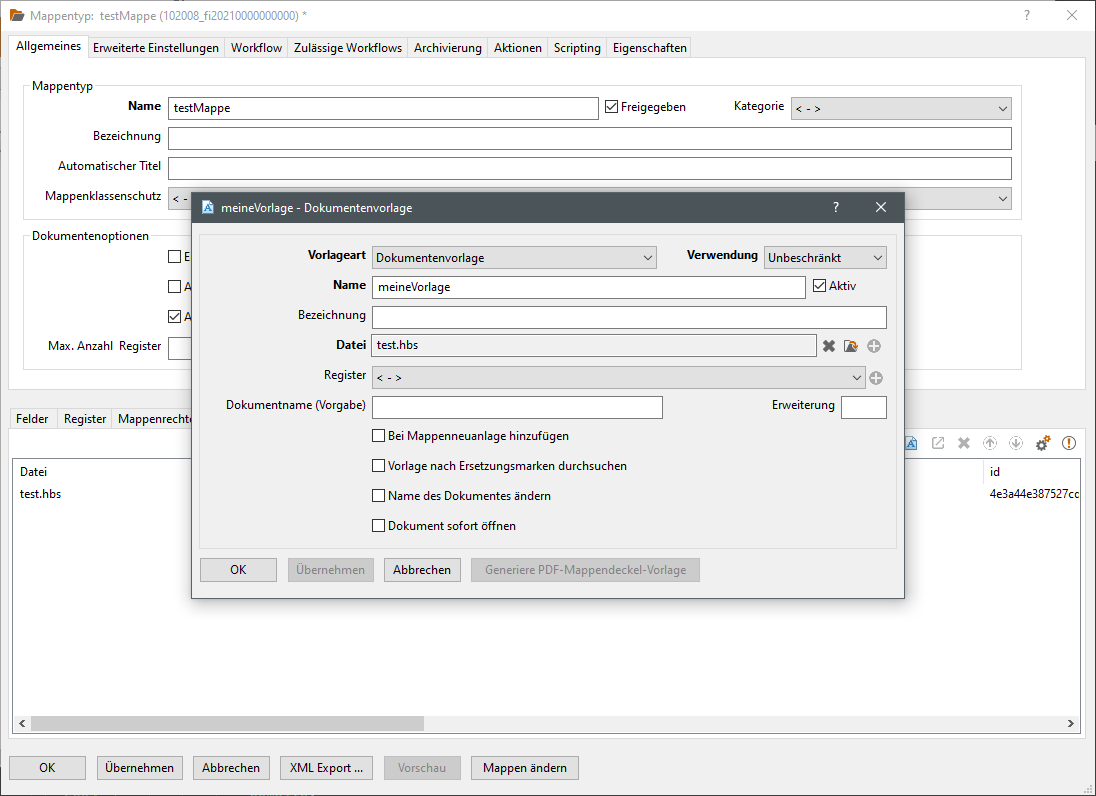
fromDocFileWithDocumentTemplate : Report
Erstellt eine neue Report Instanz. Dabei wird die Dokumentenvorlage des Mappentyp von docFile geladen und mit dem Daten aus dem DocFile kompiliert.
fromDocFileWithDocumentTemplate(docFile: DocFile, templateName: string, additionalData?: Object): Report
Parameter
docFile: DocFile: Das DocFile welches verwendet werden solltemplateName: string: Die zu verwende Dokumentenvorlage des MappentypsadditionalData?: Object: Optionale Daten
Beispiel
context.enableModules();
const { Report } = require("ou.sp.Report");

const report = Report.fromDocFileWithDocumentTemplate(context.file, "meineVorlage");
fromString : Report
Erstellt eine neue Report Instanz anhand des angegebenen Handlebar-Templates.
fromString(handlebarTemplate: string, data: object, compileOptions?: CompileOptions): Report
Parameter
handlebarTemplate: string: Das Handlebar-Templates, welches verwendet werden solldata: object: Das Daten-Objekt, welches die Daten enthält.compileOptions?: CompileOptions: Optionale Kompiler-Optionen für Handlebars, siehe Handlebars-API.
Beispiel
context.enableModules();
const { Report } = require("ou.sp.Report");

const report = Report.fromString("<h1>Hello {{name}}</h1>", {
    name: "Chuck"
});
fromDocumentTemplate : Report
Erstellt eine neue Report Instanz anhand des angegebenen Mappentyp und Dokumentenvorlage.
fromDocumentTemplate(fileTypeName: string, templateName: string, data: Object): Report
Im Gegensatz zu fromDocFileWithDocumentTemplate wird hier nur der Mappentyp übergeben. Es werden keine Daten aus einem DocFile geladen!
Parameter
fileTypeName: string: Der gewünschte MappentyptemplateName: string: Die zu verwende Dokumentenvorlage des Mappentypsdata: object: Das Daten-Objekt, welches die Daten enthält.
Beispiel
context.enableModules();
const { Report } = require("ou.sp.Report");

const report = Report.fromString("testMappe", "meineVorlage", {
    name: "Chuck"
});
fromFilePath : Report
Erstellt eine neue Report Instanz anhand des angegebenen Datei aus dem Dateisystem.
fromFilePath(filePath: string, data: object): Report
Parameter
filePath: string: Handlebar-Template als Dateipfad.data: object: Das Daten-Objekt, welches die Daten enthält.
Beispiel
context.enableModules();
const { Report } = require("ou.sp.Report");

const report = Report.fromString("D:\\EASY\\Workflow-ext\\reports\\ou\\cust\\custom-report.hbs", {
    name: "Chuck"
});
Instanz Funktionen
save : string
Speichert den Report als HTML-Datei auf dem Dateisystem.
save(filePath?: string): string
Parameter
filePath?: string: Optionaler Dateipfad. Wird kein Pfad angegeben, so wird ein Temp-Pfad generiert (context.getTmpFilePath)
Beispiel
context.enableModules();
const { Report } = require("ou.sp.Report");

const report = Report.fromString("<h1>Hello {{name}}</h1>", {
    name: "Chuck"
});

const filePath = report.save();
// filePath: "/tmp/doc5_tmp/6f9972f9-3767-48e8-94e0-2be6dd1246ad.html"
context.enableModules();
const { Report } = require("ou.sp.Report");

const report = Report.fromString("<h1>Hello {{name}}</h1>", {
    name: "Chuck"
});

const filePath = report.save("D:\\tmp\\report.html");
// filePath: "D:\\tmp\\report.html"
saveAsPdf : PdfSaveResult
Speichert den Report als PDF-Datei auf dem Dateisystem und gibt eine PdfSaveResult Instanz zurück.
saveAsPdf(
    filePath?: string,
    options: ReportPdfStoreOptions = {
        templateSaveFilePath: "",
        deleteTemplateFile: true
    }
): PdfSaveResult
Parameter
filePath?: string: Optionaler Dateipfad. Wird kein Pfad angegeben, so wird ein Temp-Pfad generiert (context.getTmpFilePath)options: ReportPdfStoreOptions: Optionale SpeicheroptionentemplateSaveFilePath: Speicherort für Html-DateideleteTemplateFile: Löschflag für temporär gespeicherte Html-Datei
Beispiel
context.enableModules();
const { Report } = require("ou.sp.Report");

try {

    const report = Report.fromString("<h1>Hello {{name}}</h1>", {
        name: "Chuck"
    });

    const result = report.saveAsPdf();
    // result.filePath: "/tmp/doc5_tmp/6f9972f9-3767-48e8-94e0-2be6dd1246oj.pdf"
    result.uploadTo(context.file, "attachments", "report.pdf");

} catch (error) {
    context.errorMessage = error.message;
    context.returnValue = -1;
}
context.enableModules();
const { Report } = require("ou.sp.Report");

const report = Report.fromString("<h1>Hello {{name}}</h1>", {
    name: "Chuck"
});

const result = report.saveAsPdf("D:\\tmp\\report.pdf", {
    templateSaveFilePath: "D:\\tmp\\report.html",
    deleteTemplateFile: false
});
// result.filePath: "D:\\tmp\\report.pdf"
// Html-Template erreichbar unter: "D:\\tmp\\report.html"
toGadget : string
Gibt den Report als Gadget zurück.
toGadget(id?: string): string
Parameter
id?: string: Optionale Gadget-Id
Beispiel
gadgetConfig:
{
    gadgetScript: 'Gadget_ou.cust.demo.filetype.html.report',
    gadgetAction: 'build'
}
// Portalskript: Gadget_ou.cust.demo.filetype.html.report


context.enableModules();
const { Report } = require("ou.sp.Report");

const report = Report.fromString("<h1>Hello {{name}}</h1>", {
    name: "Chuck"
});

context.returnValue = report.toGadget();
toString : string
Gibt den Report als HTML-String zurück.
toString(): string
Beispiel
context.enableModules();
const {  Report } = require("ou.sp. Report");

const report = new Report("<h1>Hello Chuck</h1>");

const template = report.toString();
// template: "<h1>Hello Chuck</h1>"
PdfSaveResult-Klasse
Die PdfSaveResult-Klasse wird durch saveAsPdf erzeugt.
delete : string
Löscht die Datei auf dem Dateisystem
delete(): void
Beispiel
context.enableModules();
const { Report } = require("ou.sp.Report");

const report = Report.fromString("<h1>Hello {{name}}</h1>", {
    name: "Chuck"
});

const result = report.saveAsPdf();
// ...
result.delete();
uploadTo : Document
Lädt die PDF-Datei aus dem Dateisystem in eine Mappe unter Verwendung der addDocumentFromFileSystem-Funktion.
Die Datei wird danach vom Dateisystem gelöscht.
uploadTo(
    docFile: DocFile,
    targetRegister: string,
    targetFileName: string
): Document
Parameter
docFile: DocFile: Das DocFile zu dem das Pdf hinzugefügt werden solltargetRegister: string: Das Register zu dem das Pdf hinzugefügt werden solltargetFileName: string: Der Dateiname
Beispiel
context.enableModules();
const { Report } = require("ou.sp.Report");

try {

    const report = Report.fromString("<h1>Hello {{name}}</h1>", {
        name: "Chuck"
    });

    const result = report.saveAsPdf();
    const document = result.uploadTo(context.file, "attachments", "report.pdf");

} catch (error) {
    context.errorMessage = error.message;
    context.returnValue = -1;
}
// ... document.size etc.
PdfConverter Interface
export interface PdfConverter {
    convert(inputFilePath: string, outputFilePath: string);
}
convert : void
Konvertiert die Eingabe-Datei in eine PDF-Datei (Ausgabe)
convert(inputFilePath: string, outputFilePath: string): void
Parameter
inputFilePath: string: Die Eingabedate (HTML-Datei)outputFilePath: string: Die Ziel-Ausgabedatei (PDF-Datei)
Beispiel
context.enableModules();
const { Report } = require("ou.sp.Report");

const myCustomPdfConverter = {
    convert: function(inputFilePath, outputFilePath) {
        // your logic here
    }
};
const report = new Report({
    html: "<h1>test</h1>",
    myCustomPdfConverter,
});

const result = report.saveAsPdf();